

Key takeaways
- Qualified leads are the business. Bad phone numbers are one of the fastest ways to lose buyers, clients, and team morale.
- Check two things on every phone number: is it a valid, active line, and is the person who submitted the form holding the phone?
- In-field validation answers the first question with a real-time lookup and lets you block numbers by rules before the lead is captured.
- OTP pin code validation answers the second question. Expect about 12 to 20% drop-off, and start optimizing around 25 to 30%.
- Not all OTP drop-off is bad. Spam and bots that slip through can inflate it.
- Use both. Validating in the field first means your OTP credits go to the best numbers, and partial lead capture catches leads who drop on the PIN code step.
Why phone verification matters: qualified leads are the business
Whether you sell leads to buyers and clients, run a lead gen agency, or generate leads for your own sales team, the universal truth is the same. You need qualified leads. If you generate leads for other people, your leads are your product. If you generate them for your own team, they are part of what you provide. Everything starts to fall apart the minute the leads are bad. People complain, morale crashes, and the business does not perform.
Why verify at the point of capture
One of the easiest ways to end up with unqualified leads is calling numbers that are dead, inactive, submitted by spammers, or made up by people who just like filling out forms. Bot submissions are rising with AI. Most teams only find out when they go to make the call. Verifying the phone number in the form, before the lead is captured, weeds out bad numbers before they ever reach your buyers and clients.
Quality is the new default. Before 2019, when John started LeadCapture, he had to explain why validating the phone number mattered. In 2026, most people come to LeadCapture already knowing they need it.
AI calling and SMS raised the stakes
More teams now call and text leads with AI. That makes bad numbers more expensive in three ways:
- Deliverability. Calling and texting dead or bad numbers can hurt deliverability for both.
- Compliance. In the U.S., using an AI calling system to call numbers from people who did not submit your form can create legal risk. See lead gen compliance.
- Downstream. Bad numbers that slip through to your buyers, clients, or team create unhappy relationships and churn.
Two things to check on every phone number
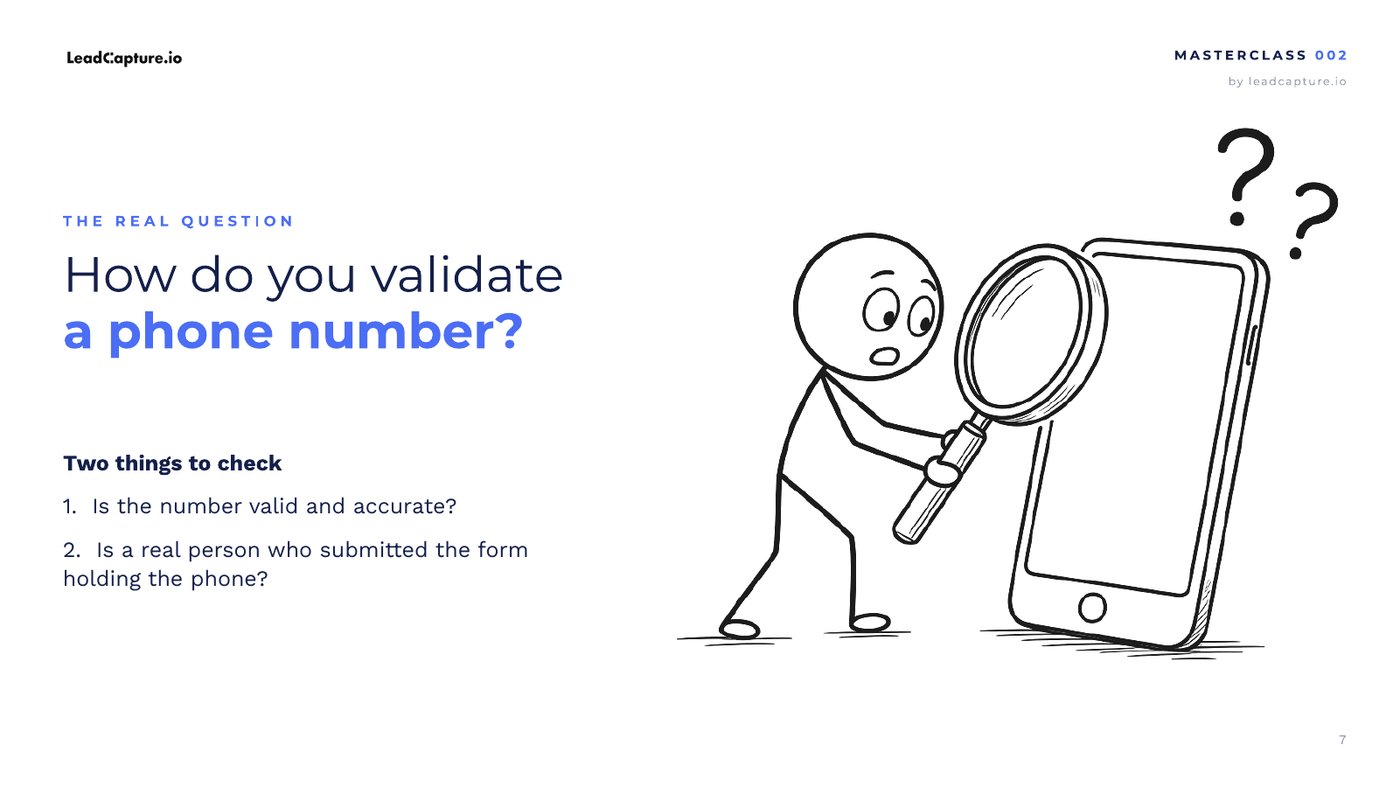
Phone validation is a big rabbit hole, but it comes down to two questions. Many people mix them up or only check one.
- Is the number valid and accurate? Is it actually an active line?
- Is the person who submitted the form holding the phone?
Punch 1: in-field phone validation
Strategy one is to check the line right in the phone field. As soon as someone types their number, a real-time lookup runs behind the scenes in a fraction of a second. Nothing extra is asked of the person filling out the form.
What a real-time phone lookup shows
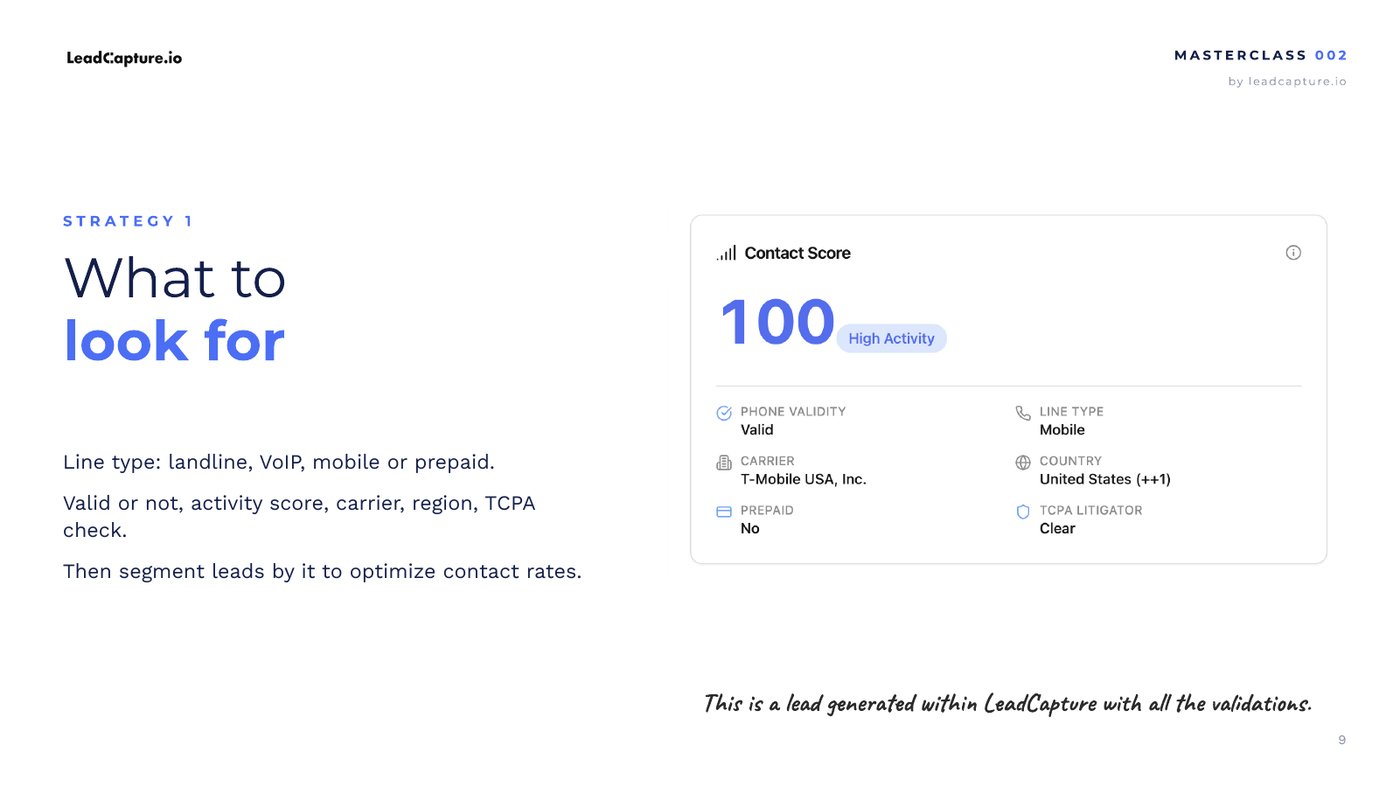
In LeadCapture the lookup returns an activity score (how active the line is), whether the number is valid, the carrier, whether it is prepaid, the line type, the country, and a TCPA litigator check. That data lands on the lead record as part of lead verification and the contact score.
Block bad numbers with rules
Once you have the data, you decide what gets through. For example, you can choose not to accept prepaid numbers, numbers with an activity score below 20 or 30, numbers that are not clear on the litigator check, or certain line types like VoIP. Only the good numbers move on.
Punch 2: OTP pin code validation
OTP stands for one-time passcode, or one-time password. The person enters their phone number, goes to the next step, and types in a PIN code sent to their phone before the form submits. It adds friction, but it is good friction. It confirms the person filling out the form is actually holding the phone.
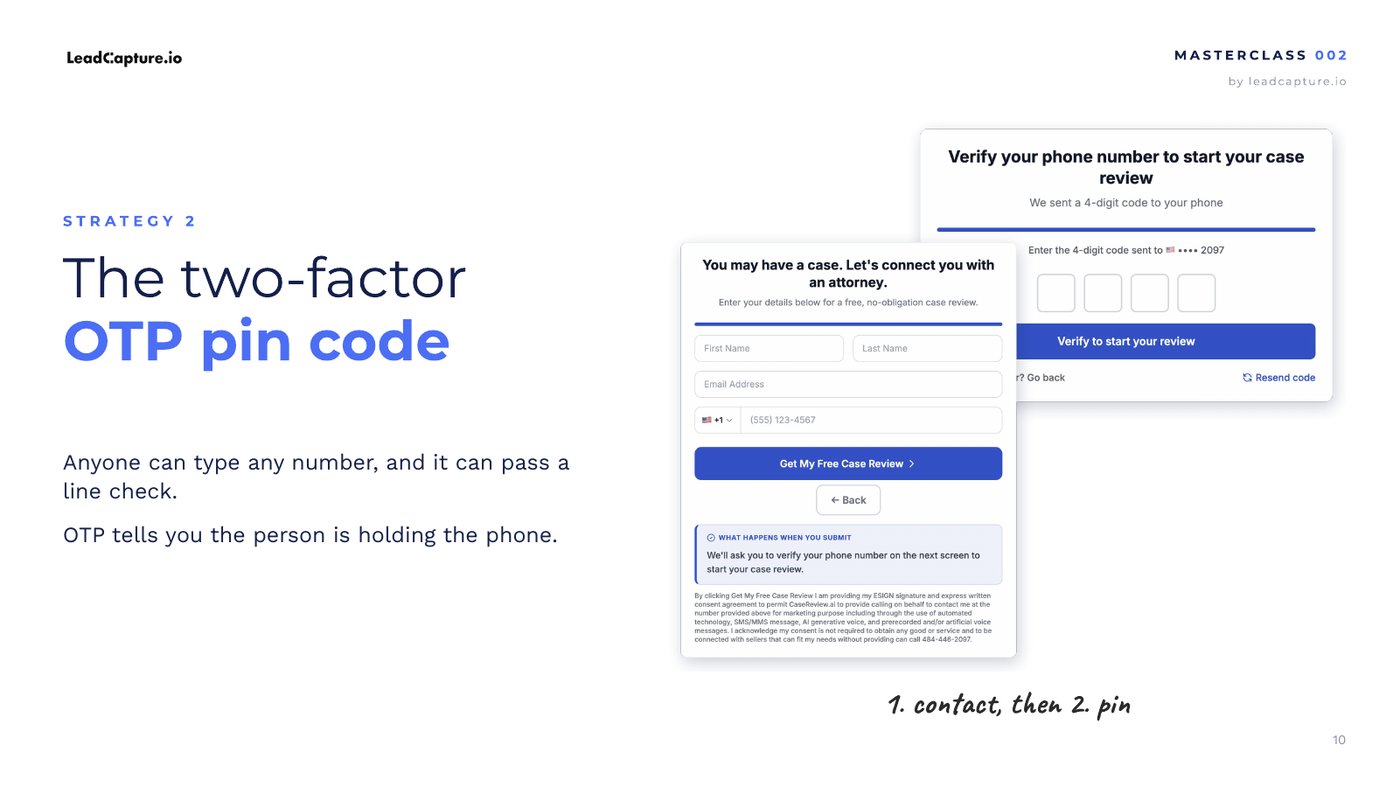
In LeadCapture, both are a flip of a switch. For in-field validation you choose to only enrich, or to enrich and validate with rules. For OTP, turning it on adds a step to your funnel that captures the PIN code.
Will OTP kill your conversion rate?
This is the big fear. In John's experience, it usually does not.
How much OTP drop-off is normal
Expect about 12 to 20% drop-off on the OTP step. It depends on your traffic source and vertical, so treat it as a general view.
- 12 to 15%: you are good.
- Around 20%: might not be the worst thing.
- 25 to 30%: the high end. Time to look at why and optimize.
Two easy ways to lower OTP drop-off
- Tell them a code is coming. On the contact step, explain they will get a PIN code to enter on the next step. People put in the right number and keep their phone nearby.
- Be clear on the OTP step. Do not just say "enter your PIN code." Explain why, and make the call to action more compelling.
Not all OTP drop-off is bad
In verticals like personal injury and insurance, a lot of form submissions are spam and bots. Some slip past everything else, and sometimes OTP is your only defense. You often do not know it is a bot until it hits the OTP step and stalls. Spammers cannot keep paying for phones just to enter PIN codes, so they get slowed down and your drop-off rate goes up.
So be careful about the story you tell yourself about that number. Some of it is your lowest intent traffic getting filtered out. And the flip side: someone who takes the time to enter a PIN code is showing intent. If you are an agency or lead seller, that lets you position your leads as the highest intent leads.

"My audience is older. They won't do OTP."
This comes up a lot in annuities and final expense. Three answers from the video:
- Even in final expense, John sees OTP drop-off still in the 12 to 15% range, and that number may include form spam hitting the step.
- A lot of seniors now use smartphones that can receive a code.
- An OTP code can still go to a landline as a voice call.
Not something to worry about. Something to test.
Start free trialSee lead verification
Why use both: the 1-2 punch
It is not either or. If you want to use OTP at all, John recommends using both, because the two tactics have different jobs.
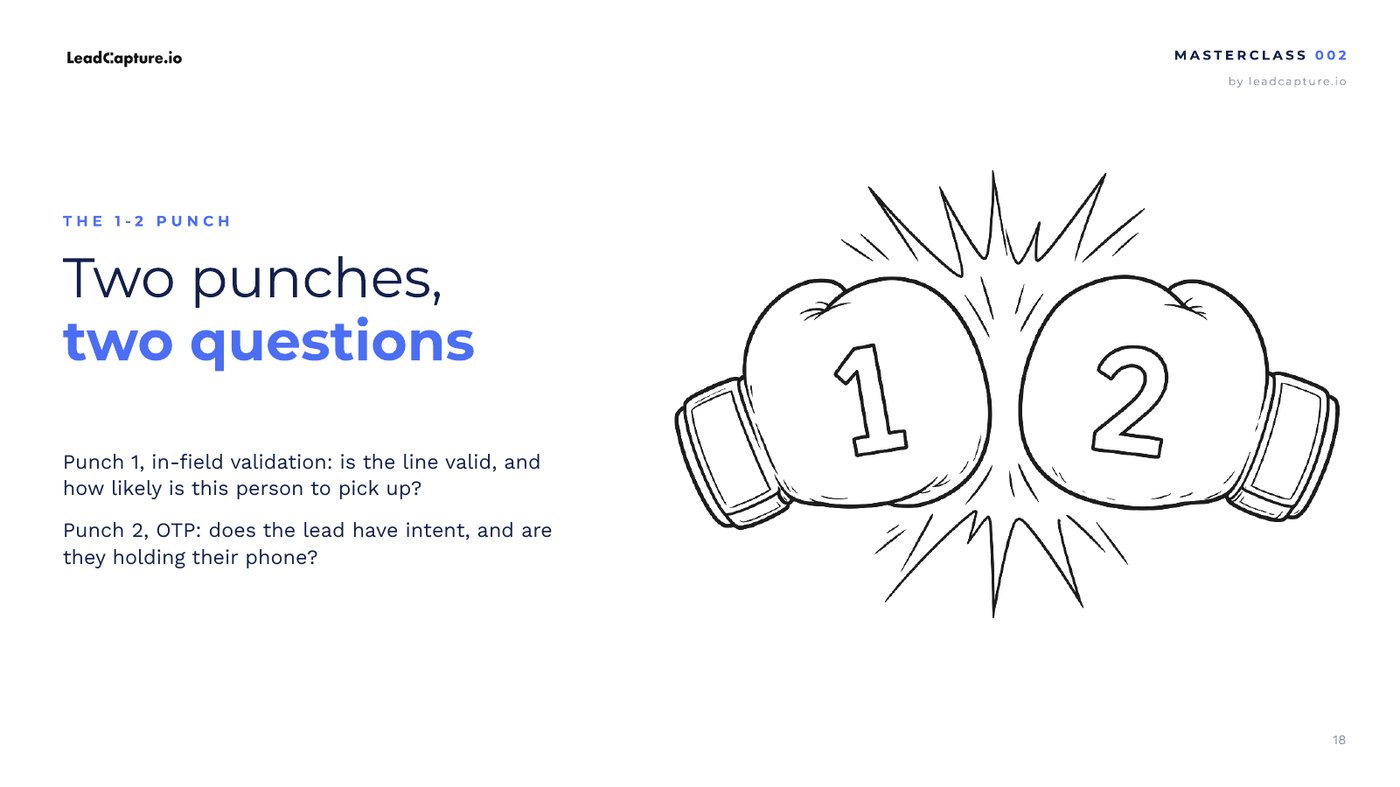
Two punches, two questions
- Punch 1, in-field validation: is the line valid, and how likely is this person to pick up? It also stops the numbers you do not want from ever reaching the OTP step.
- Punch 2, OTP: does this lead have intent, and are they holding the phone? Unless someone is very sophisticated, they will not game it.
How the 1-2 punch saves OTP credits
OTP is not the cheapest way to verify a number. Delivering a code means sending it to the lead's phone from a dynamic number, matching their country, and handling compliance. A lookup in the field costs less. So run it first and block prepaid numbers, inactive or low activity lines, phone types you do not want, and anything that fails the TCPA check. Then only the best numbers reach the OTP step, you get a cleaner read on what your drop-off rate really means, and your OTP credits go to the very best numbers.
What it looks like in practice
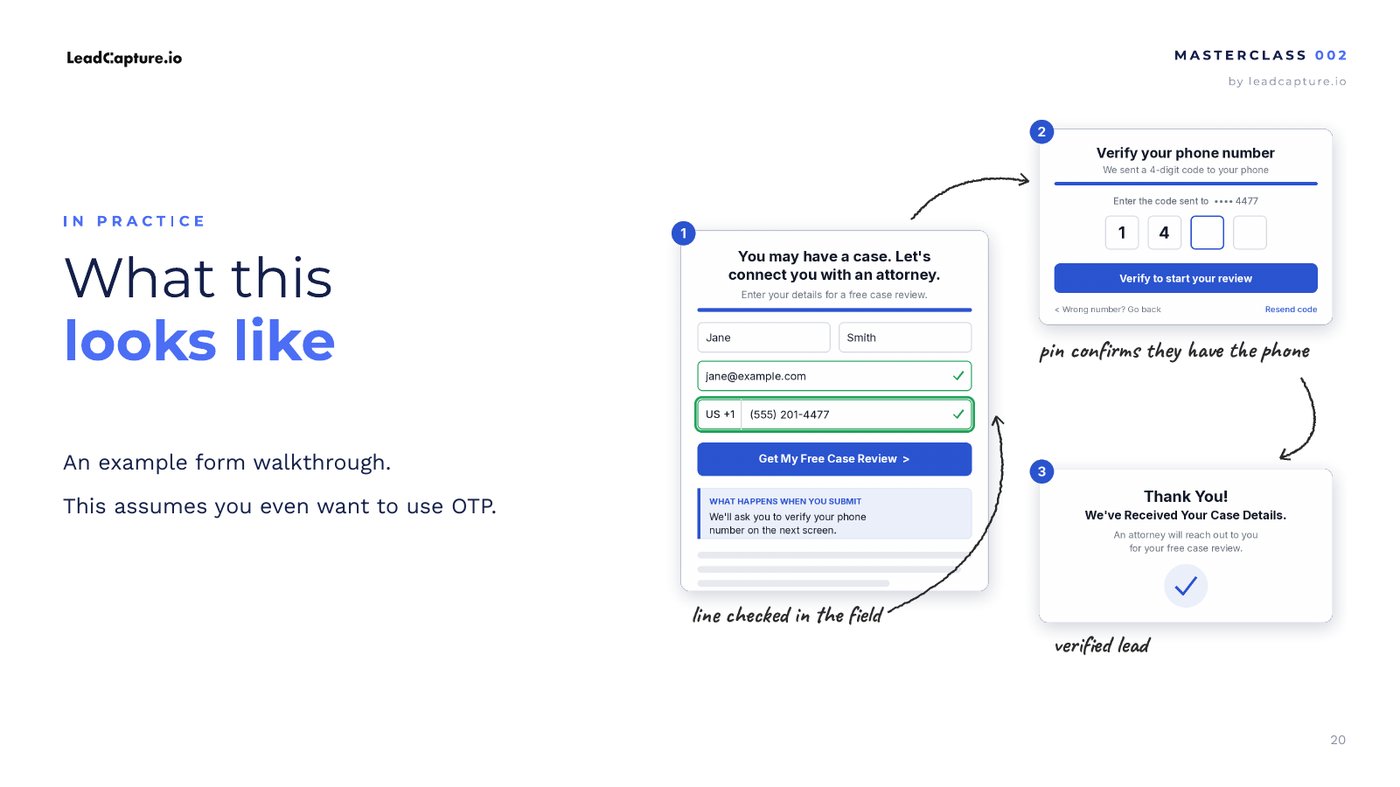
Someone hits your contact step and the line is checked as they type: activity, line type, carrier, location, TCPA check. If you block them, they stop there. If they pass, they go to the OTP step, enter the PIN code, and land on the thank you step.
Partial lead capture as a drop-off safety net
Worried about losing leads on the PIN code step? Turn on partial lead capture. You still capture the lead even if they reach the OTP step and bounce. In-field validation, OTP, and partial lead capture work together. Most people miss that.
If you had to pick one
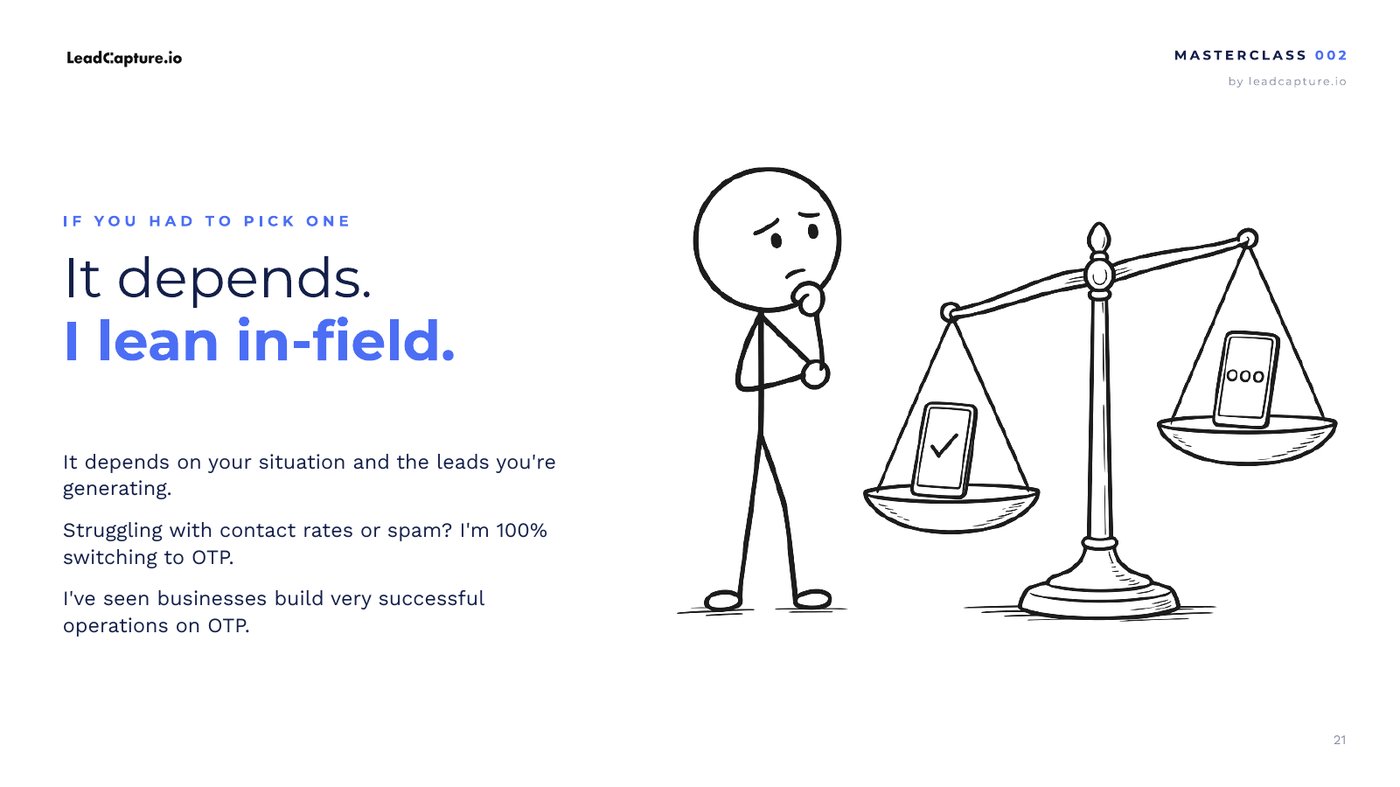
John would lean toward in-field validation, because it is quick and adds no friction. He would add OTP if he were positioning himself as selling the highest intent leads, wanted to make sure every lead had intent, or was dealing with spammers and needed more control and better contact rates downstream. Either way, he would not ditch the in-field check.
How to set it up in LeadCapture
- Turn on in-field phone validation on your phone field. Choose enrich only, or enrich and validate with rules.
- Pick what to block: prepaid numbers, low activity scores, line types you do not want, and numbers that are not clear on the TCPA litigator check.
- If you want intent too, turn on OTP pin code verification. It adds the PIN code step to your funnel.
- On the contact step, tell people a code is coming. On the OTP step, explain why and make the call to action clear.
- Turn on partial lead capture so you keep leads who drop on the PIN code step.
- Check your OTP drop-off rate. 12 to 15% is good. At 25 to 30%, optimize.
Frequently asked questions
What is a phone verified lead?
A lead whose phone number was checked before the form was submitted. In-field validation confirms the line is valid and active, and an OTP pin code confirms the person who filled out the form is holding the phone.
What is the difference between OTP and in-field phone validation?
In-field validation runs a real-time lookup on the number as it is typed, showing data like activity score, carrier, line type, prepaid status, and a TCPA litigator check. OTP sends a one-time PIN code to the phone and asks the person to enter it. The first checks the line. The second checks that the person is holding the phone.
Will OTP kill my conversion rate?
In John's experience you should expect about 12 to 20% drop-off on the OTP step, depending on traffic source and vertical. 12 to 15% is good. At 25 to 30%, start optimizing. Telling people on the contact step that a code is coming, and making the OTP step clear, both help.
Should I use OTP or in-field validation?
Both, if you want OTP at all. They answer different questions, and validating in the field first means only the best numbers reach the OTP step. If you have to pick one, John leans in-field because it is quick and adds no friction.
Does OTP work for older audiences, like final expense?
John says that even in final expense, OTP drop-off is still in the 12 to 15% range. Many seniors now use smartphones, and an OTP code can still go to a landline as a voice call. Test it.
Full transcript
Show the full transcriptHide the transcript
0:00The 1-2 punch for phone verified leads
I hope you brought a mouthguard and some boxing gloves, because in today's LeadCapture Masterclass I'm going to share the one-two punch for capturing more phone verified leads, to help you lift the quality of your leads. And I'll show you how to do it without tanking conversion rates, of course.
Because here's the thing. At the end of the day, nothing is better than knowing that the person on the receiving end of your leads, whether that's a lead buyer, a client, or a sales team, is calling a lead with an active line who actually wants to hear from them, who has intent. If you can make that true with almost every lead you capture, it's completely game changing on so many levels. I see this play out time and time again.
Over at LeadCapture, we're fortunate enough to have built these features into the platform. We've captured millions of leads, we've verified millions of leads, and we have a lot of data around this. Because of that, I have a unique perspective on validating phone numbers and capturing the highest quality leads, and that's what I want to share in this video.
1:05PIN code or in-field validation?
When people come to LeadCapture to improve the quality of their leads, they often already know there's something they can do about it. A lot of people are educated on this, and there are two ways to do it. You can validate a phone number with a PIN code, or inside the field. And they often come to me and say, John, what method should I use to validate the phone number?
For those of you who don't know, when I say PIN code validation, I mean sending a PIN code to someone's phone at the point of submission, before they submit the form, and making them enter it. I know it sounds crazy. You might be thinking, why would you add so much friction to your form? There are a lot of reasons for that, and we'll get to them in a moment, along with whether it's even something you should be considering.
There are different ways to validate a phone number. I've learned a lot from the data, and I've learned a lot from building these features, seeing how they're used, and understanding their nuance and mechanics. So I have a bit of a unique perspective, and I want to share that different take, plus some tactics for how to go about this.
Before we dive in, the big question is: why should you be validating phone numbers at all, especially in your form, before you've even captured the lead?
2:26Qualified leads are the business
I always like to say qualified leads are the business. Write that down. Sketch it into your head. Put it on a shirt. Maybe I'll make shirts that say qualified leads are the business.
I don't care what type of business you're in. I don't care what vertical you're in or what you sell. I don't care if you're a lead seller selling leads to clients, a lead gen agency, or you run your own business as a mortgage broker or insurance agent. The universal truth across every business that captures leads or needs leads is that they need qualified leads.
If you're generating leads on behalf of other people, your leads are your product. So obviously you want them to be as qualified as possible. If you're generating leads for your own team, your sales team or your agents, the leads are part of what you provide. The leads are part of your product. The leads are the business, and everything starts to fall apart the minute the leads are bad. People complain, people get upset, morale crashes, and the business doesn't perform as well.
Qualified leads are the business. Remember that, because we'll come back to it time and time again, in this video and in other videos I create. Every business needs leads, that's true. But what they really need is qualified leads. I'd go so far as to say maybe not every business needs leads. What they do need is qualified leads.
3:52Why verify phone numbers at the point of capture
So why verify the phone number at the point of capture? Simply to weed out bad numbers. One of the easiest ways to end up with unqualified leads is calling numbers that are dead, numbers that aren't active, numbers spammers submit, and numbers submitted by people who just like to fill out forms. Yes, that happens. People spend time completing forms they never intended to complete, sometimes with bogus numbers. I don't know why people do that, but it happens.
Bot submissions are insane right now because of AI, and that's probably increasing. So it's not uncommon to get very bad phone numbers in your forms, and unfortunately people don't find out until it's too late, when they go to make the call.
4:49Quality is the new default
This is the big mindset shift. Quality is the new default. To give you a sense of how far we've come, before 2019, when I really started LeadCapture, I had to educate people on why validating leads mattered and why they should validate the phone number. Now, in 2026, as I shoot this video, so many people come to LeadCapture already in the mindset that they need to do something like this. They already know there are solutions. Or in some cases they don't know about the solutions, but they know it's a problem, usually by the time it's too late.
5:32AI calling and SMS raised the stakes
Here are three more reasons this matters more than ever right now. A lot of it comes down to the fact that AI calling and SMS marketing raised the stakes to a whole new level. People weren't doing as much of that in 2019, especially the AI part, but now there's a lot of it happening. And there are three problems that can happen.
First, if you're calling dead or bad numbers, that can hurt the deliverability of both text messages and phone calls.
Second, major compliance risk. If you're in the U.S., using an AI calling system, and calling numbers from people who didn't actually submit your form, that could land you in legal trouble from a compliance perspective.
Third, everything that happens downstream. If bad phone numbers slip through the cracks to your lead buyers, your clients, or your internal team, it creates a very unhappy situation for everybody and can lead to churn.
6:34Two things to check: active line vs holding the phone
So the question becomes, and so many people come to me asking this: how do you validate a phone number in the first place, and what's the best strategy? There are so many ways to approach it. It's a big rabbit hole once you really go down how it all works. But I can simplify it for you right now, and that's the point of this masterclass.
There are two main things you want to check. Thing number one: is the phone number valid and accurate? Is it actually an active line? Thing number two: is the person who submitted the form actually the owner of the phone? Are they holding the phone?
These are two completely different things, but many people mix them up, or forget they need to check both. You could say that if you know someone is holding the phone, it's probably a good number. But there are other data points you want to understand about the phone number beyond whether they're holding it. And that eventually leads us to my somewhat different, recommended point of view on how to handle phone validation in your forms and funnels.
7:53Punch 1: check the line in the phone field
Let's start with number one: is the number valid and accurate? What does the number look like, and what's the metadata around it? Strategy number one is to check the line in the field, right in the phone field. This is a real-time lookup of the phone number. Someone simply enters their phone number into the field, and you can look up all sorts of information about the phone.
8:12What a real-time phone lookup shows
For example, this is a screenshot pulled directly from LeadCapture of a phone number that was submitted. It's actually my phone number, and it shows a number of data points about the phone. We get an activity score: how active is the line? My wife and mom call me a lot, so that's probably why it's at 100. Whether or not the phone is valid. The carrier. You can see I'm on T-Mobile. I don't particularly love them, but that's who I'm using right now. Is it a prepaid number? No. Line type. Country. And is this a lawyer or a TCPA litigation firm trying to set up a lawsuit? It's clear. We run a TCPA check on the numbers. All of this happens in real time, in a fraction of a second, and we capture this data right in the phone field.
9:02Block bad numbers with rules
Now we can use this data in a number of ways. We could block the phone number. We could say, I don't want to accept prepaid numbers. I don't want to accept numbers with an activity score lower than 20 or 30. I definitely don't want to accept someone who isn't clear on the litigator check. I don't want to accept a specific type of line, like VoIP. You can use this data in all sorts of ways to weed out and screen bad phone numbers so only the good ones get through. That's the first piece of the puzzle, and this feature is absolutely game changing for lead quality.
9:27Punch 2: OTP pin code validation
Then there's this bizarre concept, in many ways, because you're adding more friction to the form: two-factor OTP, which stands for one-time passcode or one-time password. PIN code validation. This one is more intense. In the first example, someone just enters their phone number and everything happens behind the scenes. In the second example, someone actually has to enter a PIN code. They put their phone number in, they go to the next step, and they enter a PIN code. You're adding a lot of friction here, but it's good friction. There are reasons you'd want to use OTP PIN code validation, and we'll get to them soon.
10:24Both are a flip of a switch in LeadCapture
Inside LeadCapture, all of this can be set up with the flip of a switch. For in-field validation, you just flip a switch. You can choose to only enrich, or to enrich and validate with rules, which is what I just talked about. For OTP PIN code validation, you flip a switch, and it adds a step to your funnel to capture the PIN code that's sent to the person's phone.
10:51Will OTP kill my conversion rate?
That leads to the question: will OTP PIN code validation kill my conversion rate? This is one of the big things I wanted to address. Like I said at the beginning, a lot of people come to LeadCapture knowing they want to validate phone numbers, or knowing they have an issue downstream with fake or invalid phone numbers, or they just want to improve contact rates. And they ask, should we use OTP? Should we use in-field phone validation? What strategy should we use?
Many people are afraid to use OTP because they think it will kill their conversion rates. As I said, it adds quite a bit of friction to the form. And again, I'm in a position to share my take because I've seen a lot of data on this.
11:38How much OTP drop-off is normal
So here's the thing. When you're using OTP phone validation, when you have someone put a PIN code in, you should expect to see about a 12 to 20% drop-off rate. 12 is more on the normal side. It really depends on your traffic source and your vertical, so take this as a general view. If you're getting up toward 25 or 30%, that's on the high end. I'd be looking at why it's causing so much drop-off, and that's when you'd want to start optimizing. The good news is there are a lot of ways to lower that drop-off rate.
So if you're watching this and you're using OTP PIN code validation, go check your drop-off rate. If it's around 12 to 15%, you're good. If it's 20%, it might not be the worst thing, and I'll explain why even a higher rate isn't always bad. If it's 30%, I'd be looking to optimize things.
12:39Two easy ways to lower OTP drop-off
There are a couple of simple things you can do to optimize the OTP step. First, on the contact step, simply explain that they'll get a PIN code they need to enter on the next step. This makes people more likely to put in the right number, and it puts them in the mindset that they need their phone near them, or need to be near a landline. Because yes, you can still send an OTP PIN code to a landline.
Second, be really clear on the OTP step itself. Some people just say, enter your PIN code. Explain why they're entering it, and make the call to action a little more compelling. I'll show you an example of that in a moment.
13:24Not all OTP drop-off is bad
Here's the big mindset shift, and it's one of my points of view. Not all drop-off is bad when it comes to OTP phone validation. Typically all we want to see is high conversion rates. But keep in mind, especially today and especially in certain verticals like personal injury and insurance, a lot of the people submitting forms are spam and bots. There's a lot we can do to stop spammers, bots, and bad leads from getting through, and I'll have a masterclass on that at some point. But in many cases they still find a way to slip through, and sometimes OTP phone validation is your only defense. Unfortunately, you don't know for sure that it's a bot until it hits the OTP step and gets blocked, and then you see that drop-off rate go up.
So sometimes bots and bad submissions inflate the drop-off number. That drop-off number doesn't necessarily mean good traffic is dropping off. In fact, some of your lowest intent traffic could be part of that number. So be careful about the story you tell yourself about your OTP drop-off number, because a high drop-off rate could mean you're just getting pummeled with spam. Spammers submit your phone number step and get the OTP PIN code, but because they don't have a phone, or they can't keep paying for phones just to enter PIN codes, they get slowed down and the drop-off rate goes up.
So keep that in mind. There's really no silver bullet for stopping spammers. There are a lot of little things you have to do, and OTP PIN code validation is one of them. That's one of the reasons people use it, aside from helping determine whether the lead even has intent.
15:27A PIN code shows intent
Another perspective: if someone is willing to sit there and take the time to put a PIN code into a form because they're actually interested, it shows they have intent. If you're an agency or a lead seller, you can position yourself as having the highest intent leads, because receiving a code and putting it into a form is one of the highest friction things you can ask someone to do. So those are the two perspectives. A high OTP drop-off rate isn't always a bad thing, but there are obviously things you can do to improve it.
15:59"My audience is older. They won't do OTP."
Another question we get from people deciding between OTP and in-field validation: my audience is on the older side. We see this in annuities and final expense. They won't use OTP. Well, a few answers to that.
First, we see that even in categories like final expense, OTP drop-off is still in the 12 to 15% range. And keep in mind that number might even be blended with a lot of form spam that hits that step. So it's pretty in line with what we see across the board.
Second, a lot of seniors are now using smartphones that can receive an OTP PIN code.
Third, an OTP PIN code can still be sent to a landline. It's just read out by a robotic voice. I'd imagine drop-off is probably higher there because they need to be near the landline, but a lot of people have their computer near a landline. So it's not something I'd really worry about. It's something I would test.
17:05Which method should you use? Both.
Now the big question at hand. What method should you use? Should you validate the phone number in the field, or use OTP? My perspective is that it's not an either or situation. I personally recommend using both, if you want to use OTP at all, to get that extra boost of intent.
17:44Two punches, two questions
Part of the reason, as hopefully you saw as we went through the video, is that the two tactics have different purposes. That's why you need the one-two punch. Punch one, in-field validation, looks up the line. Is the line valid? How likely is somebody to pick up the phone? And it gives you a way to stop the numbers you don't want from getting through to the OTP step. OTP answers a different question: does this lead have intent? Is this lead actually holding the phone? Unless somebody is very, very sophisticated, chances are they won't game the OTP step.
18:22How the 1-2 punch saves OTP credits
Another benefit of using both together is that it can lower your costs. OTP phone validation isn't the cheapest way to validate phone numbers. There's a lot of infrastructure behind it. You have to deliver the code to the lead's phone number using a dynamic phone number. For example, if they're in a different country, you need to match their country. There's a lot of compliance that goes into it. Long story short, it's more expensive than running a lookup inside a field.
Because of that, it's to your advantage to do everything you can to stop the phone numbers and lines you don't want, and the spammers, from getting through. So the one-two punch can actually save you money. You run in-field validation and block prepaid numbers, inactive or low activity lines, certain phone types, and anything that fails the TCPA check, right at the phone field. Then only the best phone numbers get through.
If you do that, you also get a much better read on what your drop-off number actually means. You're cleaning up the numbers in the field, so a much better number comes through. And most importantly, your OTP credits go toward the very best numbers.
19:43In practice: contact step, OTP step, thank you
So here's what this looks like in practice. Imagine someone goes through your funnel. They hit your contact form step, right here. You can see the line is being checked. This is where we check how active the line is, what type of line it is, the carrier, where they're calling from, whether it clears a TCPA check, and the list goes on. If they don't get past this step because you're choosing to block them, that's it. If they do, they go to the OTP step. They enter their OTP PIN code, and then they hit the thank you step.
20:14Partial lead capture as a drop-off safety net
Another tactic: let's say you want to avoid losing leads to drop-off completely. Just turn partial lead capture on, and you'll still capture the lead, even if they hit this step and bounce. So if you're worried you'll have a massive drop-off rate, partial lead capture will help you.
These two features work together, and I think many people miss this, so I really want to emphasize it. I don't think it should always be an either or situation. They work together.
20:49If I had to pick one
But if I had to pick one, if you came to me and said, John, you have to pick one, I'd probably lean toward in-field validation, just because it's so quick and it doesn't add that extra friction. But if I were in a situation where, A, I was positioning myself as offering the highest intent leads, B, I just wanted to make sure my leads had intent, or C, I was dealing with spammers or just needed more control, plus the ability to improve contact rates downstream, I'd be looking at using OTP phone validation as well. But I definitely would not ditch the in-field phone validation check.
21:28Set it up in LeadCapture
So that's the masterclass for today. All of this can be set up inside LeadCapture, and it's very easy. You flip a couple of switches and choose your settings. For in-field validation, you just choose what you want to block: by line type, by activity score, and so on. That's all there is to it. If you have any questions about this, feel free to reach out, and stay tuned for the next masterclass session.
More from the LeadCapture Masterclass
Masterclass 001 covers how to automate funnel and ad reporting with AI agents. More episodes on conversion rate optimization and compliance are on the way.
Watch Masterclass 001All episodes
Capture phone verified leads
Start free with LeadCapture. In-field phone validation and OTP pin code verification are each a switch.
Lead verification
Phone validation, contact score, and email verification before the lead is captured.
Download the slides
Ungated PDF of the Masterclass 002 deck. Same content as the video visuals.