
Key takeaways
- Track platform-reported leads next to real funnel leads, then use true CPL (spend divided by real leads).
- Judge Google Ads at the keyword level, not only the campaign level.
- Let an agent review search terms and propose negatives, with your approval if you want it.
- Pair Funnel Forensics with an agent that knows your business so you get a short list, not a data dump.
- Keep a human in the loop. Agents buy back time. You still own the decisions.
- Pick an agent platform and start. The model wars are a distraction.
Why ad and funnel reporting is so painful

Campaigns take work. You build the ads, launch them, tune the settings, and stand up the landing page or quiz funnel. Then the hard part starts: receiving the data, digesting it, and deciding what to do next.
Most teams report wrong, and it is not their fault. The platforms do not make it easy. Spreadsheets take days. Leadership wants the story, not a dump of numbers. That gap is where time and money get burned.
The $20K to $30K attribution software lesson
About 12 years ago John worked at a company spending across a bunch of ad platforms. They built every report in spreadsheets. It took days.
So they bought attribution software. It cost about $20,000 to $30,000 per year. They hired someone who knew Python and SQL just to run it. It took months and engineering time to get the data in.
Then they sent the reports to leadership, and leadership was not happy. They had the data. They did not have the story. Getting data into a tool is half the battle. The other half is explaining what it means and what to do next. That second half is where agents finally earn their keep.
What an AI reporting agent does differently
Agents do not just pull numbers into a sheet. They read the data in the context of your business and tell you what to do with it. That is the shift from fixed software reports to personalized dashboards molded the way you work.
Agents that work without you at the computer
An agent with its own computer can work while you sleep, remember context about your goals and customers, and keep refreshing the report. You are not stuck inside each ad platform clicking around.
Keep a human in the loop
This is not about replacing people or handing decision making to agents. Agents should do the clicking around in software so you can focus on strategy. Have them propose changes. Approve the ones that matter.
Inside the dashboard
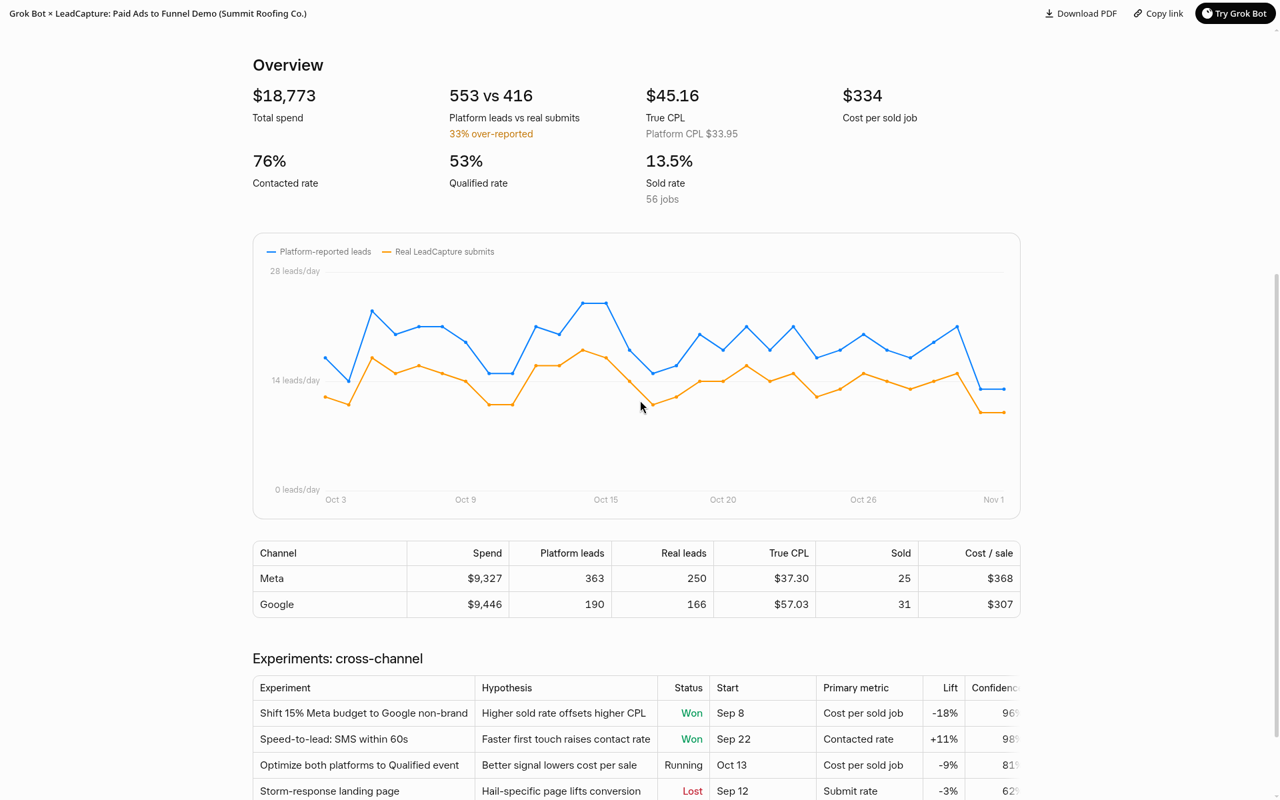
The sample dashboard is structured as Overview, Meta, Google, and Funnel. None of the numbers on screen are real account results. They are demo data set up to show the structure.
Demo data on every screenshot below. Not real account results.Overview and what to fix this week
Start high level: blended spend, platform-reported leads vs real submits, true CPL, and a short "what to fix this week" list the agent drafts from the data.
Experiments inside your reports
Instead of keeping experiments in a separate spreadsheet away from GA4 or attribution software, bring them into the same report. The agent can update status and recommend next actions.
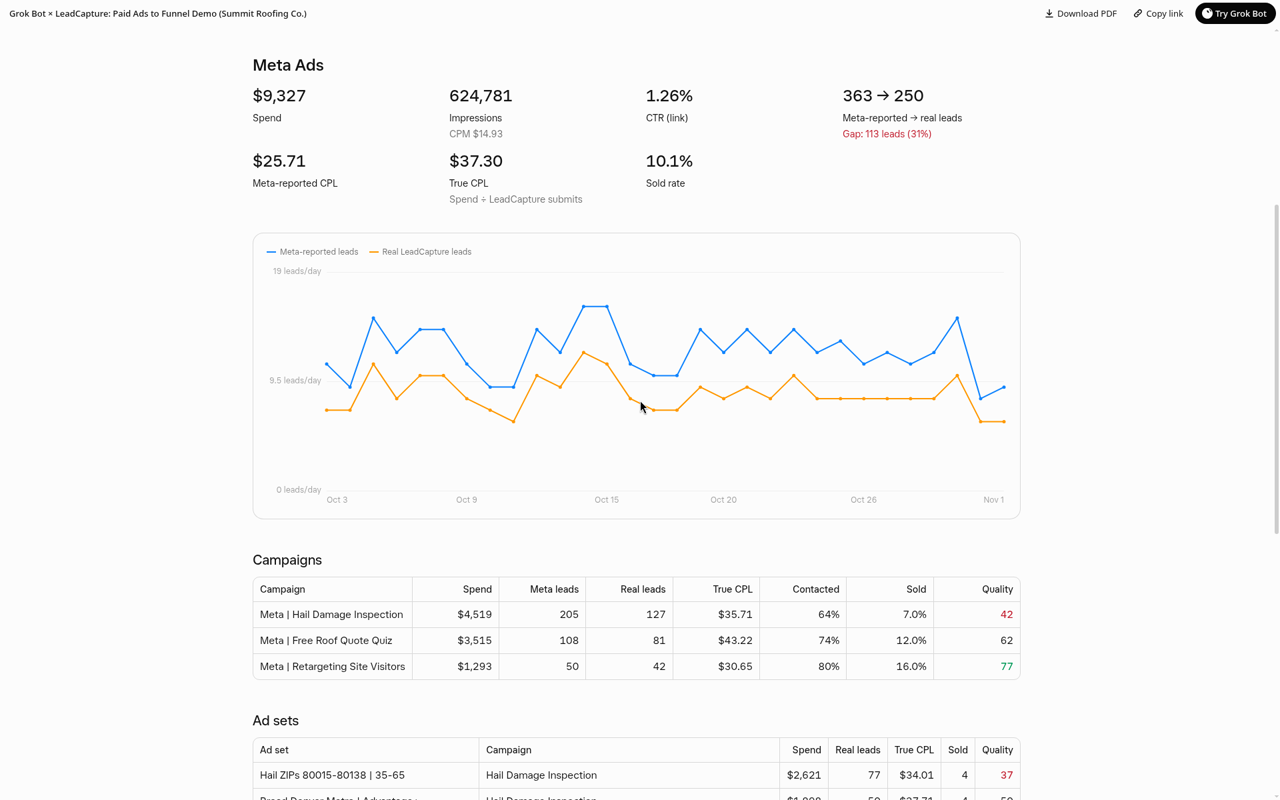
Meta Ads: reported leads vs real leads and true CPL
Platforms often over-report leads. In John's experience they usually seem off by about 20% to 30%. Track Meta-reported leads next to real LeadCapture submits, then calculate true CPL as spend divided by real leads. See also our guide on Meta conversion tracking for lead generation.
Google Ads: cost per lead by keyword
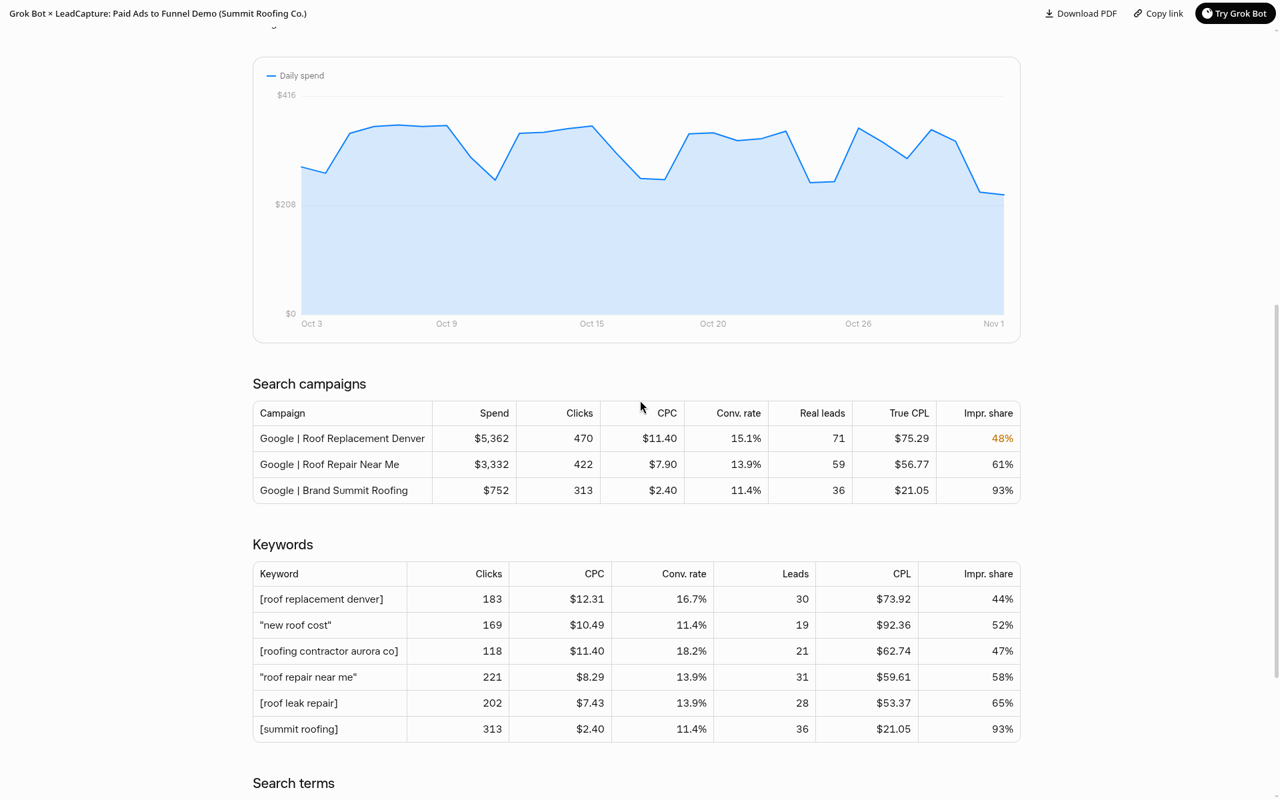
Most people stop at the campaign level. A campaign is usually a few great keywords carrying bad ones that drag CPL up. Report cost per lead by keyword or keyword cluster, then cut what is dragging and fund what works.
Search terms and negative keywords
Nobody enjoys the search terms report. An agent can review it, flag junk terms, and recommend negatives. If it is connected to Google Ads (for example through Ryze), it can add them, or ask for approval first.
Funnel reporting with Funnel Forensics
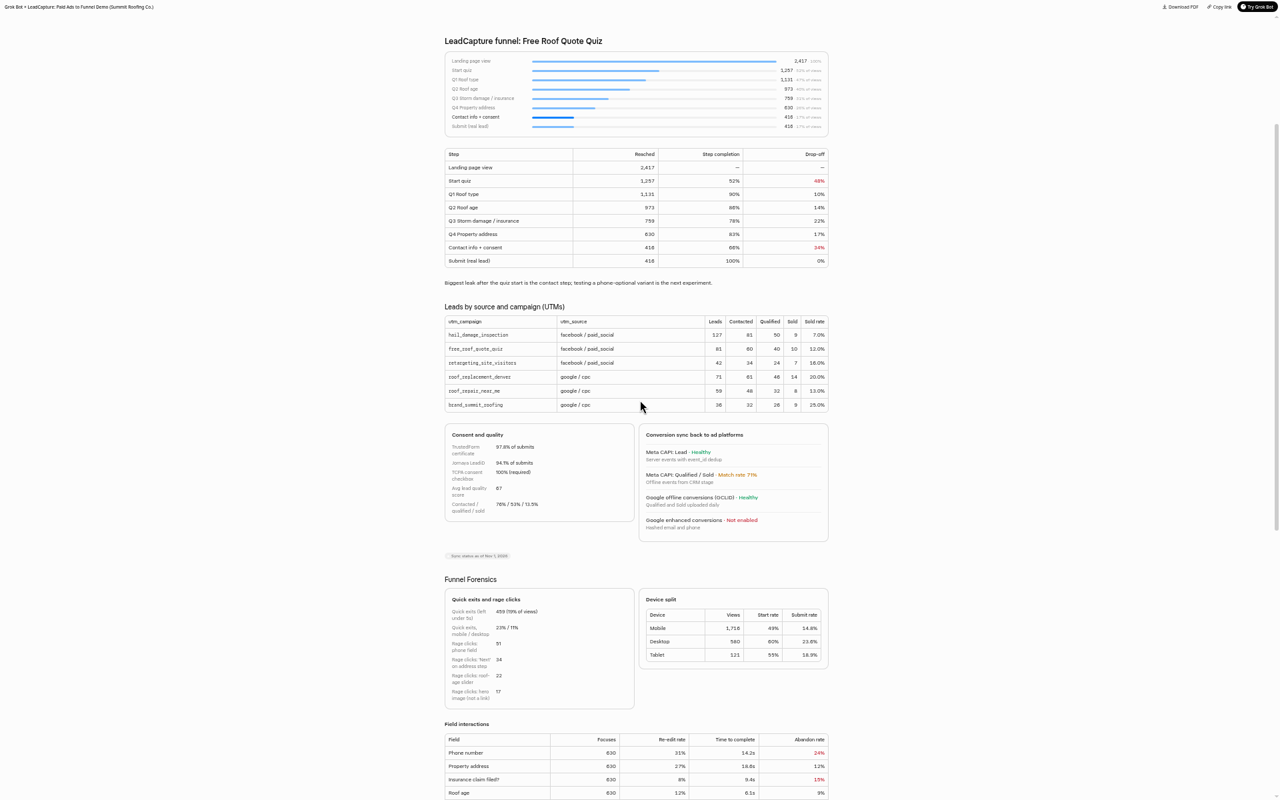
Funnel Forensics covers quick exits under five seconds, rage clicks, per-field abandon rates, hesitation, device split, UTM breakdowns, consent capture, conversion sync health, and A/B tests. The data is rich. Digesting it is hard. An agent that knows your business can hand you the short list first. See how the numbers are collected on form and funnel analytics.
Start free trialConnect your agent (MCP)
The stack: LeadCapture MCP, Meta MCP and Ryze
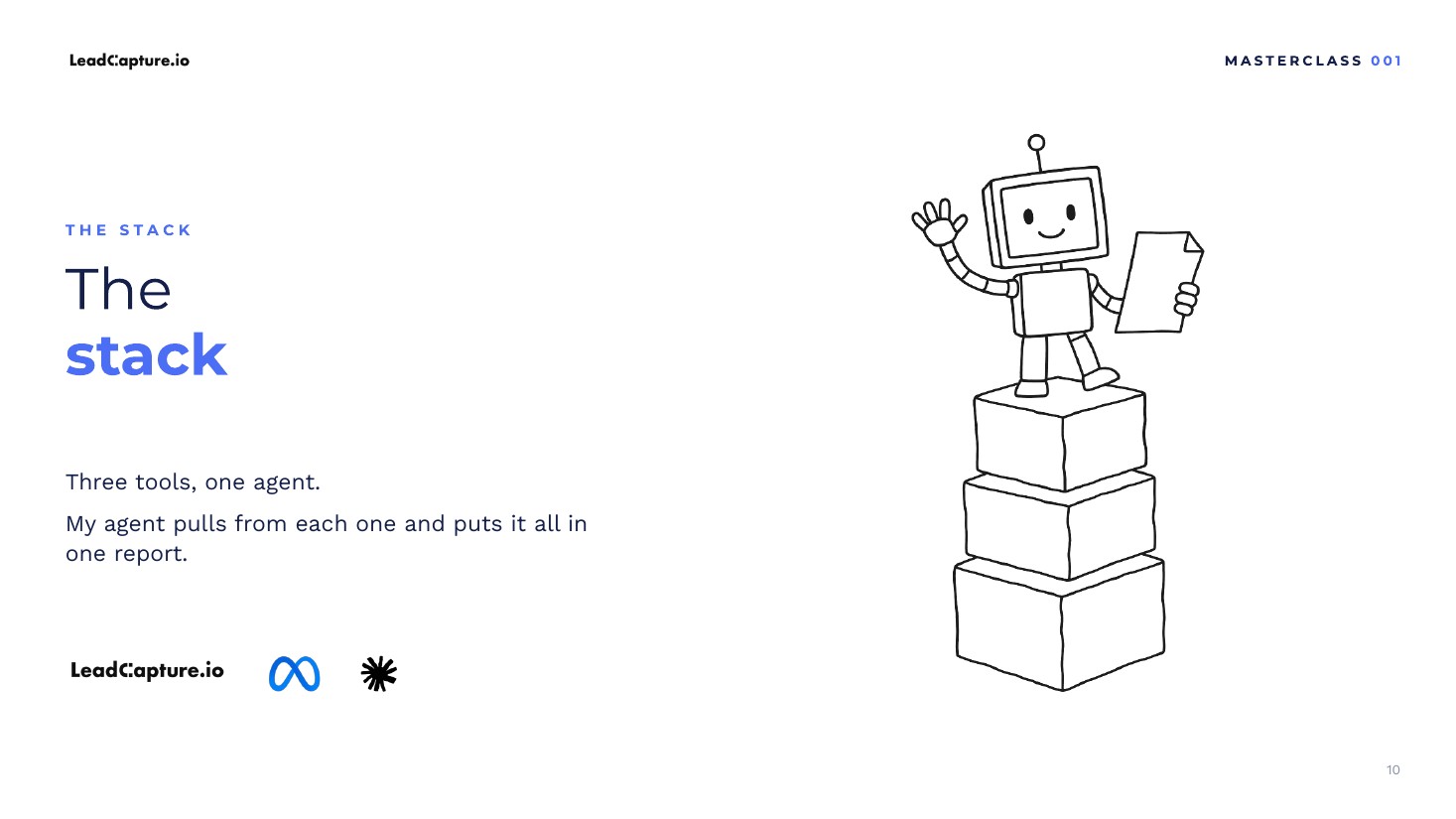
Three tools, one agent:
- LeadCapture MCP (70+ MCP tools) for funnel data, Funnel Forensics, consent, and conversion sync
- Meta MCP for Meta Ads
- Ryze for Google Ads and Search Console (LeadCapture is not affiliated with Ryze; ryze.ai)
Use whatever form or landing page tool you want on the funnel side, as long as it exposes a usable MCP or API.
How to set it up in 4 steps
- Pick an agent platform (Grokbot, Claude, or ChatGPT).
- Connect your form or funnel tool by MCP or API (LeadCapture MCP).
- Connect Meta Ads (Meta's MCP or Ryze) and Google Ads plus Search Console (Ryze).
- Paste the prompt below, or ask your agent to design a reporting agent and fill in the gaps for your business.
The full reporting agent prompt
Copy this into Grokbot, Claude, or ChatGPT. Tell the agent which tools to connect.
Build me an interactive dashboard Page that connects my paid ads to my real LeadCapture funnel results. Use my connected Meta Ads, Google Ads, and LeadCapture accounts. Pull funnel data (views, starts, step completion, submits, Funnel Forensics, consent, conversion sync, lead status) from LeadCapture, and match leads to ads using UTM source, campaign, ad set, and ad.

Global filters: date range (7, 30, 90 days, default 30), channel (All, Meta, Google), and campaign. Tabs:

1) Overview
- Total spend, platform-reported leads vs real LeadCapture submits, true CPL (spend divided by real submits), cost per sold job, and contacted, qualified, and sold rates.
- Daily trend chart (spend, reported leads, real leads) and a split by channel.
- "What to fix this week": 3-5 numbered, specific action items based on the data.
- Experiments table covering cross-channel tests: name, hypothesis, status (running, won, lost, queued), start date, primary metric, lift, confidence, next action.

2) Meta Ads
- Spend, impressions, CPM, CTR, Meta-reported leads vs real LeadCapture leads with the gap shown explicitly, Meta CPL vs true CPL, and a daily trend chart.
- Campaign, ad set, and creative tables, each with a lead quality score (based on the contacted, qualified, and sold rates from LeadCapture).
- Experiments table for Meta tests (creative and hooks, audiences, CAPI optimization, form types).

3) Google Ads
- Search campaigns with CPC, conversion rate, CPL, true CPL, and impression share (including share lost to budget and to rank).
- Top keywords and search terms, flagging terms that should be added as negatives.
- Daily spend and leads trend chart.

4) Funnel (from LeadCapture)
- Step-by-step drop-off from page view to start, each quiz step, and submit.
- Leads by UTM source and campaign, with contacted, qualified, and sold counts.
- TrustedForm and Jornaya consent capture rates.
- Conversion sync status: Meta CAPI and Google offline conversions (events sent, match rate, last sync, errors).
- Funnel Forensics: quick exits (under 5 seconds) by device, rage clicks by element, per-field behavior (focuses, re-edit rate, time to complete, abandon rate), time and hesitation per step, device split, and a top 5 friction points list.
- A/B tests: variants, visitors, submits, conversion rate, lift, confidence, sold rate, a clear recommendation, and action items.
- Experiments table for funnel tests.

Make it clean and readable for screen sharing, with clear numbers, simple charts, and no clutter. Flag any metric that can't be pulled from my accounts instead of estimating it, and refresh the data each time I open it.
If the prompt does not fit your business
Tell your agent what you want in your reports, then ask it to fill in the gaps based on what it knows about your business. Use the prompt as a starting point, not a rigid template.
Which agent should you use: Grokbot, Claude or ChatGPT?
Do not get stuck picking the "right" model. They are all good enough now. John uses Grokbot for strategy and Claude for technical work. Pick one you like and start. We are moving into a bring-your-own-agent world: reporting does not need to live inside each platform. More on that shift in the four generations of landing page builders.
Frequently asked questions
What is an AI reporting agent?
An always-on agent that connects to your ad platforms and lead funnel, builds a dashboard around how you work, analyzes the data in context, and tells you what to fix. It can also propose or make changes when connected, with your approval.
Which tools do I need to automate ad reporting with AI agents?
An agent platform (Grokbot, Claude, or ChatGPT), the LeadCapture MCP for funnel data, Meta's MCP or Ryze for Meta Ads, and Ryze for Google Ads and Search Console. LeadCapture is not affiliated with Ryze.
Does this only work with Grokbot?
No. This is the Grokbot edition, but John says Claude, ChatGPT, and others work. Pick one and start.
Can the agent make changes in Google Ads?
Yes, if it is connected (for example through Ryze). It can add negative keywords from the search terms review. You can require approval before it writes changes.
Are the numbers in the video real?
No. Every dashboard number shown is demo data set up to show the structure. Do not treat sample CPL, abandon rates, or spend as LeadCapture account results.
Full transcript
All dashboard numbers shown in this video are demo data.
Show the full transcriptHide the transcript
0:00Welcome to LeadCapture Masterclass 001
Welcome to the very first LeadCapture Masterclass. I'm your host, I'm John, the founder of LeadCapture.io, and the whole point of these Masterclass videos is to share tactical and strategic insights and advice into what's working right now from the trenches, when it comes to things like using AI to build lead funnels more efficiently, conversion rates and lead quality, all based on things we are learning in real time.
Today's first video is all about how I'm currently automating lead funnel and ad reporting across multiple sources with autonomous AI agents that are building personalized dashboards for me. This is completely game changing, and I'm really excited to share everything I'm learning right now.
Now this is the Grokbot edition, but everything I'm sharing could work for Claude, ChatGPT Dots, and whatever else comes up in the next few months, or maybe even a few weeks at the rate that AI is moving. At the end of the video, I'm going to share a full prompt that you can drop into your own agents to get everything set up yourself, and we'll talk a little bit about setup as we go. But before we dive into all of this, I just want to paint a picture.
1:09The morning coffee dashboard
This is me in the morning. This is me waking up, coming down and sipping a cup of coffee, usually looking at a computer, but sometimes I do this straight from my phone because these agents are connected across devices. And I'm looking at a personalized dashboard that has been built for me with all of my traffic sources.
Everything is funneling into one dashboard, and this dashboard is showing me what campaigns are working, what traffic sources are working, where money is being spent, what's slipping, what needs attention, and where the opportunities exist. It's providing a level of insight that I could never get before. And it's all personalized to the way I want reports, to the way I work, to the way my business works.
2:00Breaking out of fixed software
And that's one of the biggest opportunities, and that's what really excites me about all of this. Because for the first time, we can get outside of the fixed nature of software. What I mean by that is with most software platforms, you're stuck using it how they're built. But with agents, they can build these personalized dashboards that are customized to how you need to report on your business. And you can get all this data in real time.
I'll be talking a little bit about what all that means and where all this is headed. I think that this is only the very beginning. There's so much more potential, and I'm only at the tip of the iceberg here with what's possible. So this person, waking up nice and relaxed, could be you getting all of your data.
Again, it's about letting your agents do the reporting for you. Automating funnel and ad reports, but not just getting a point in time snapshot. If you set these agents up the right way (prompting is not even really a thing anymore), they should also be analyzing opportunities for you. That's one of the other things that I find extremely exciting about this.
I'm going to share an example of the dashboard. I have it pulled up right here. But before we do that, let's just start with why this matters, because I have found reporting is one of the biggest pains when it comes to everything that needs to happen.
3:37Why ad and funnel reporting is so painful
There's a lot of pieces that go into setting up campaigns. You need to set up the campaign. There's ads and creative. There's launching the thing. There's the landing page and lead funnel and all that stuff. And then there's getting all the settings perfectly fine tuned in whatever ad platform you're using, and they all have their own nuance and rules.
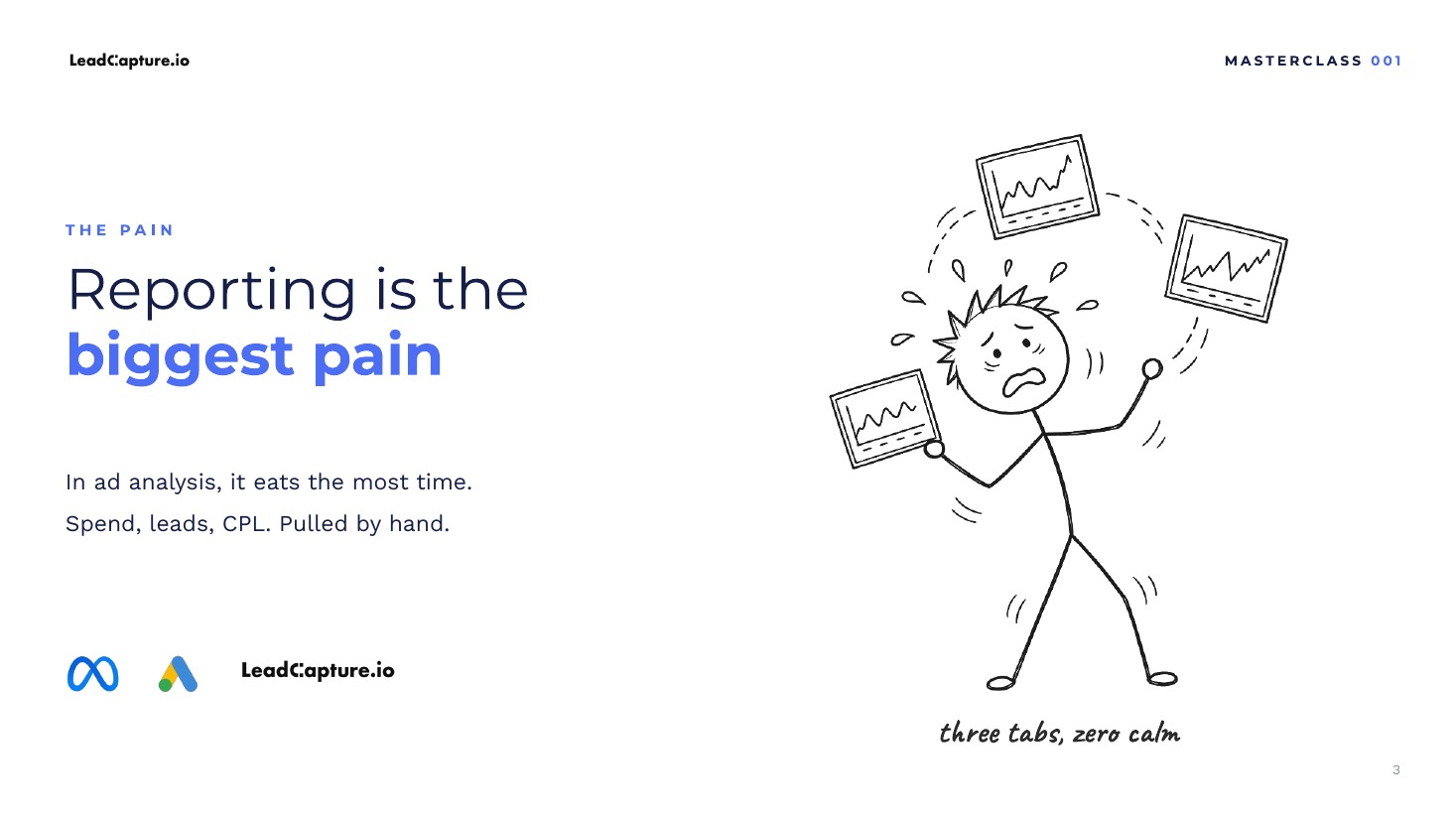
And then once you get the data, there's receiving the data, digesting the data, then understanding what to do with the data. And then you end up looking somewhat like this sometimes. I know this is how I feel sometimes, but I don't feel like that anymore. I feel more like this. It's starting to feel like we are getting to the point where we are able to just flip a switch and get whatever data we want.
4:29The $20-30K attribution software story
To give you an idea, it used to cost a small fortune to get reporting, attribution reporting, to just get the data that you want the right way. Maybe 12 years ago, I worked for a company that was driving a lot of traffic across a number of different ad platforms. And we were doing all of our reporting by hand. Well, not by hand. We were putting it in spreadsheets. It felt like it was by hand. It would take us days to just compile the reports.
When we needed to finally understand what was working and where to invest more marketing dollars, we realized we couldn't continue with that process. So we went out and bought some expensive, clunky attribution software, which was one of the best in the business. It cost us somewhere around $20,000 to $30,000 per year, just for the software. Then we needed someone who understood how to use the software, and to use it, they needed knowledge of Python and SQL.
So then we had the software. We had a dedicated person who was hired to manage the software and work with it. And then we spent a lot of time getting the data into the software. It took a few months just to get it all in properly. It took engineering resources. We had to reconfigure event tracking and analytics. It was a huge headache.
And then we got it all in and we started sending our C-suite and leadership reports, and they weren't happy. I remember thinking, why aren't they happy? We did everything that they wanted us to do. We got the software, we can see reports in real time. They weren't happy because we weren't telling them the story of what the data meant. That created a lot of issues internally.
That was one of my biggest realizations when it comes to reporting and data in general. Getting the data into the platform is half the battle. Once you get the data into the platform, you need to be able to articulate what the data means and understand what to do with it. And that's where AI is extremely important.
6:24How AI agents change reporting
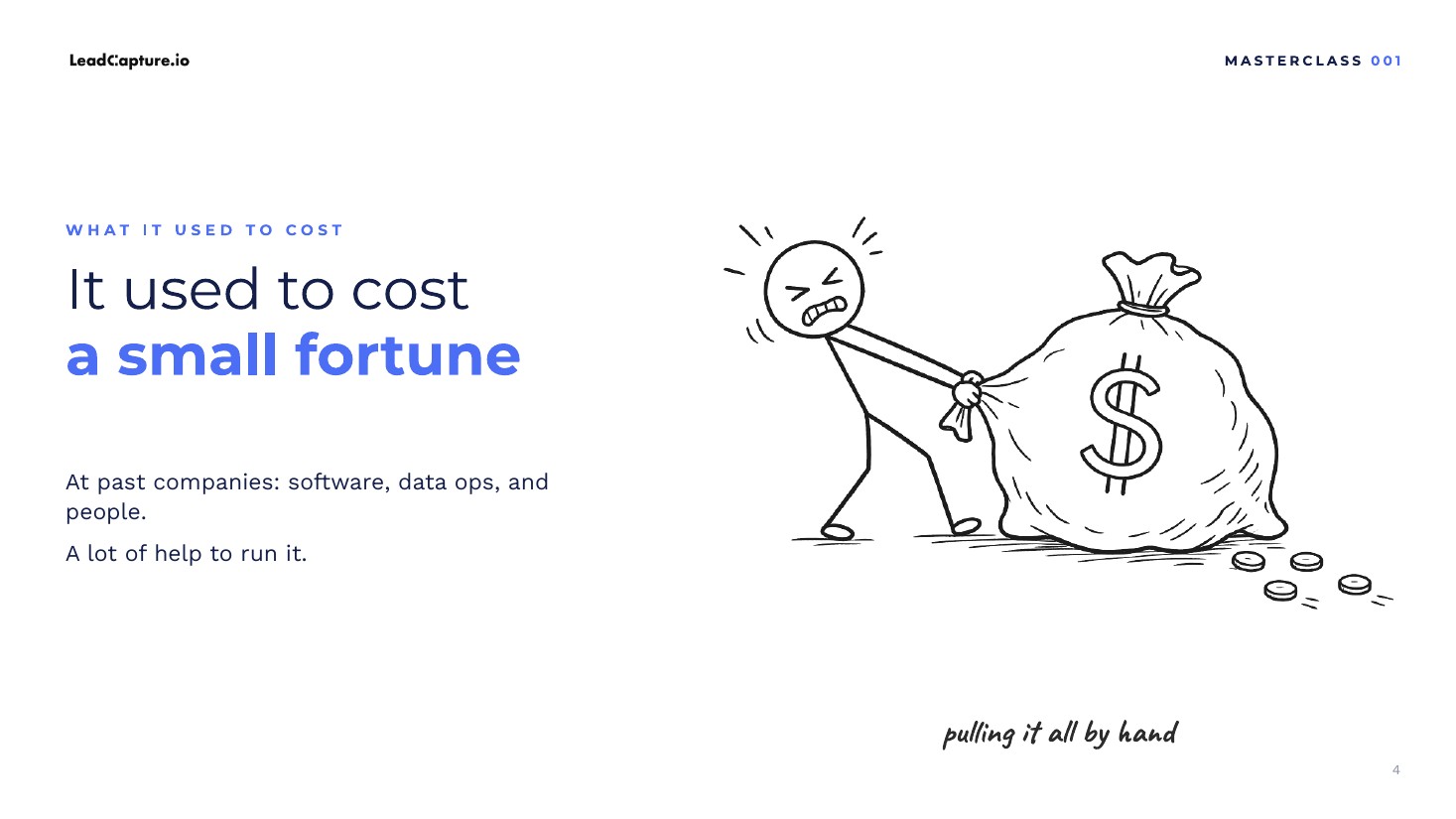
It helps us digest data in the context it understands about our business. But it also now helps us pull the data in. And by the way, this was me dragging a giant bag of money to what felt like a dumpster fire. Once AI agents came into the picture, this process started looking and feeling like we were flipping a switch.
The capability to have agents autonomously put these types of reports together has only really become a thing for the average small business or lead generator recently. And I don't think there's many people talking about this, which is why I really wanted to cover it for this first Masterclass session.
The game has completely changed. Most people, unfortunately, do not report on their metrics properly to begin with, because it's really hard to do. If you're one of those people, it's not your fault. I've been there. I am there sometimes. It's hard, depending on what you're trying to measure. And even companies that you would think have it right, that have millions of dollars to invest, like the company that I worked for, are still doing it wrong. Only a small percentage of people actually report on data the right way and use it the right way.
But that has all changed, because AI is game changing in this space. And the thing that makes this so much more effective, the thing that separates doing it the way I'm showing you from just going to ChatGPT (I'm not talking about their Dots version, just ChatGPT the old way, where you have it comb through some data and put it in a spreadsheet), is that the agent has its own computer.
8:24Why agents with their own computer matter
What that essentially means is the agent can work while you're asleep. The agent can work without you sitting at a computer, it can remember things better, and it can go out and do things. If you're setting things up right (I have some videos about this, and we'll shoot more later on how to do it), you can essentially build a brain. Think of it not actually as a brain, but as a database of context about your business that the agent can hook into, so it always has knowledge of your goals, your business, your customers, and everything that you would want a person to understand as they work through your business.
8:58Keep a human in the loop
Before we continue and I show you the dashboard, I want to stress that this is not about replacing people, or even you as the decision maker. I truly believe humans need to be part of the process. We do not want to just give all the decision making away to the AI agents. The goal should be to have the agents do all the things that I don't think we were put on this planet to do, like clicking around in software, so we can free up our time to focus on more strategic, high impact, high leverage activities.
9:38Dashboard walkthrough: overview and what to fix this week
So with that said, let's take a look at my dashboard. This is just one example of a dashboard. You might look at this and say, this doesn't fit how I report, this doesn't fit my use case and my business, and the prompt you're about to give me won't even work if it's going to set up a report like this. But I'm here to tell you that none of that matters, because this video is just to plant the seed in your mind for what's possible.
It's up to you to use your own imagination, because that's the one thing I think we have left as humans: your own imagination and creativity to figure out how to adapt this to your business. I'm giving you the pieces, the building blocks, but you now need to put those together and figure out how to make this work for your business. And if you figure that out, I guarantee it's going to be absolutely game changing for you.
The way I have this report structured is we have our overview and then the different channels: overview, Meta, Google, funnel data. All of this can be pulled in by an agent, again, without you having to be at a computer. You can have the agent hold context about your business while it looks across all of these data sources and gives you insights. And if you have your agents plugged into your tools, they can go in and actually begin to make changes on your behalf. Hopefully you're at least giving it instructions to make the changes you want it to make, not just letting it do its own thing all the time, or you have an employee working with these things so there's a human in the loop.
I always like to start my reporting high level and then drill down. So: what to fix this week. Here, my Grokbot is looking at my data and saying, okay, here's what we should fix. There is an issue with over-reporting on your qualified lead event. Add some negative keywords. Here's a high level blended view of spend across channels, 18,000. None of this is real data, by the way. I just wanted to get a sample set up for you, but I do have reports like this for different campaigns. Here's charts. It can build charts for you. Here's your per channel view. Again, this is all high level.
And to the point I made at the beginning of the video, one of the things that excites me most about doing this with agents, whether that's Grokbot, Dots or whatever, is that it can be customized to how you want things to work in your own reporting workflows.
12:01Putting experiments inside your reports
Personally, I'm a big fan of experimentation, especially across channels and across the funnel. Whenever I'm running paid ads or even just building something, I do a lot of experimentation and I look for the high leverage things that will move the needle. And I always have experiments listed in my reporting.
With agents, it's so much easier to do this. Typically, I'd have a spreadsheet that's away from whatever reporting software I'm using, whether that's GA4 or an actual attribution tool. Now I can bring my experiments into the reports my agents are running for me, and they can update the experiments and make recommended notes about what to do next, and so on. That alone, for me personally, is huge, and it's an example of how you can have your agents molding and customizing your reports to the way you want to work. Suddenly reporting and dashboards are starting to feel like clay. The agents are getting their hands into it and molding it, and it's up to you to tell the agent how you want it molded.
13:10Meta Ads: reported vs real leads and true CPL
So that's the overview. We're now looking at Meta Ads. Pull in the platform numbers from Meta, Google and so on, but also, from either your CRM or your lead funnel software, pull in the exact number of leads, and then track reported versus real leads and your real CPL. That's what I like to measure, because the platforms usually seem like they're off by something like 20% to 30%. And it makes a difference in terms of decision making.
13:55Google Ads: cost per lead by keyword
There's your experiments. One of my favorite reports is in Google Ads: being able to report at the keyword level, to see what keywords, or even clusters of keywords if you want, are driving leads and what the cost per lead per keyword is. A lot of people stop at the campaign level and say, my campaign's not working because my cost per lead is too high. But usually that campaign is filled with keywords that are pulling the entire thing down.
Having the ability to pull keyword data is one of the biggest unlocks. If you think back to that original visual where I was dragging a bag of money across the floor into a dumpster fire, spending a lot of money to basically get insights, it was to get insights like this. So we could say, this keyword is driving X revenue, we should spend more money on this cluster of keywords. Now you can get that in minutes, thanks to AI.
14:50Search terms report and negative keywords
Another thing: the search terms report. Nobody that I know enjoys going into the search terms report in Google Ads, analyzing search terms, exporting them into a CSV, updating them and adding negatives. I personally hate that process, and I'm not ashamed to admit it. It's just not a good use of time and brain power. AI should be able to do that, and it can.
You'll see here: do it yourself roof patch, probably not a good keyword. It shows 34 clicks, it pulled this data out, and it recommends adding it as a negative. Now, if you have your agent hooked up to Google Ads, it could go in and add that negative for you, and suddenly you never have to do that again. It's amazing. That's the world we're living in now.
I'm still trying to understand how to articulate this exact concept of using agents to build dashboards, because it's far more than just building a dashboard. It's far more than getting a report. They're getting the report, they're analyzing the data, and then they can go ahead and do the work for you, in a very predictable way where it's not causing problems. You can even have it ask you to approve changes before it makes them, if you're really afraid that it's going to mess up.
16:12Funnel reporting with Funnel Forensics
Now, funnel reporting. This is one of my favorite dashboards, because it uses the power of LeadCapture's funnels. I'm not here to pitch you on LeadCapture, but one of the things that makes LeadCapture unique compared to most form and funnel builders out there is the level of data that we now provide. As far as I know, we're the only one that provides what we call Funnel Forensics.
This is very granular data about what's happening at the form level. We give you step-based metrics, but we let you drill deeper and see: are people rage clicking on a specific step? Are they entering their phone number in the phone field and then bailing for some reason? We're showing you all sorts of different data points.
To give you an idea, here's what Funnel Forensics looks like. You get this high level overview. We're pulling in session recordings, and AI is analyzing the session recordings to give event information. You can drill into a step. You'll see here we have our highest friction steps. We can show you friction per step, and then drill in and show you the distribution of clicks. How many people are clicking on a specific button? What's happening? Are they bailing? Did they rage click? Are there dead clicks? Did they pick a specific response and change it? All sorts of data here. And we're also showing you, at a high level, how many people hit the page and exit in the first five seconds. There's probably something to learn from that.
But the problem with this data, as amazing as it is, is that understanding it and digesting it, especially with everything we have going on in life, is really hard. And as humans, we bring our own bias into the equation. I'm guilty of that. Most people are, and there's nothing wrong with that. We're human. But this is where AI agents make a huge difference, because if they understand your business the way a human does, and hopefully without too much bias (I don't think they usually have much), they can come in, report on this data and give you unbiased insights. Then you can use your own judgment when it makes sense to decide what you want to do.
So here's our LeadCapture funnel reporting.
18:23Reading the funnel: friction points, UTMs, A/B tests
We have our step metrics. There it all is. We can report on UTMs. That's huge. It has some conversion sync data and health data, and Funnel Forensics telling you, oh, 19% of people left in the first five seconds. For the phone number step, 14 seconds to complete and a 24% abandon rate. Maybe there's something there. Maybe something needs to be adjusted.
Then it analyzes the result. Top friction point: phone field, 24% abandon rate, most rage clicks. Maybe we should take a look at that field on mobile. Contact step, 31% hover rate. Insurance question, 11.6% hesitation rate: homeowners might be unsure about what claim filed means. And you'll see it just keeps going. If you're A/B testing in LeadCapture, it can track that and tell you whether it's time to end the test. And then again, experiments.
So that's my report. That's just one report. I have reports across my entire business and all sorts of campaigns that I'm running. I also report on Google Search Console data for organic search, and agents are analyzing that data too.
19:3341 Grokbots and personal dashboards
I have 41 different Grokbots set up. I even have a Grokbot that monitors my Grokbots. I even have personalized dashboards for my own metabolic health, blood screening and blood tests. That's where we're headed. I believe everybody in the future will have their own personalized dashboards for their personal life, their business, their jobs and their finances. And I don't see that slowing down anytime soon.
So going back to our Masterclass presentation: I gave you the dashboard. There's a few things we have to discuss, like how to set this up with the prompt, so we're going to dive into that. Luckily, none of this is that hard to set up. That's also the crazy thing here. I haven't done this in Dots and Claude myself, but it's probably just as simple as Grokbot.
20:34Grokbot vs Claude vs ChatGPT: just pick one
Before we continue, one other thing I want to stress. A lot of people are going to get stuck between: do I do this in Grokbot? Do I do this in Claude? Do I do this in Dots or something else? Do what you feel comfortable with. At this point, I've tested everything, and I would say all the models are pretty much the same. Some are a little bit better, but even that changes based on the season, it seems, or on whether people are leaving different companies and what's happening in the world. All these companies seem like they're copying each other at this point, and all the models are good enough to get you what you need.
If you get stuck on which model to use and spend a lot of time spinning your wheels there, you're not going to make traction. Just pick one, stick with it, pick the one you feel comfortable with. I personally use both Grokbot and Claude. I like Claude for more technical stuff, like building on top of LeadCapture through MCP. And I like Grokbot for the strategy layer and execution on some things. Claude is more technical execution, and both are pretty good together. Grokbot can even use Claude, but that's a whole different thing.
So this leads us into the execution: how to build the dashboard. But before we get there,
21:59MCP, APIs and bring your own agent
the key thing to understand is this. It's accomplished through MCP and APIs, which is really just a technical way of saying your agents are connecting into the platforms. You want to find an MCP or an API connection for each platform. Meta has one. LeadCapture has an MCP; we expose something like 70 plus tools. You connect your agent to the tools to digest the data, and I'll show you how to easily do this with just one tool.
The thing to note is that we are entering a bring-your-own-agent world. I'll talk a little bit more about this at the end. I think that's where software is headed. As someone who's built a ton of software, I personally don't even want to be going into software that much and clicking around. Of course you have to sometimes. There are cases where you need to go in and add your human judgment and creativity to the things you're working on. But for a lot of repetitive tasks, agents can do that, and that's why the world is shifting quickly to bring your own agent.
And to tie this back to reporting, I think we're moving into a world where reporting doesn't need to live within the platforms. I mean, it does, but you shouldn't need to read reports inside the platforms, because your agents can deliver them to you wherever you are, whether you're sitting at a computer or on your phone, on a yacht somewhere, walking the dog like me, or hanging out with your kids. In fact, my agent built this entire presentation.
23:36My agent built this deck while I walked with my kids
I set this up yesterday. I gave it the creative direction. I told it what I wanted it to discuss. I wrote the script, and I said, go build this presentation. This would have taken me a while to build, especially the custom drawings. None of these are stock images. They're all custom. My agent did this while I went on a walk with my kids. We walked around the block and I hung out with them a little bit. My son didn't have school that day. So I was able to buy back my time.
And that is the reason for all of this. It's nice to talk about fancy reports. It's nice to talk about efficient ways to get the data and the insights we want. But at the end of the day, why do we do all this? I think it's freedom, and buying back our time. That's why I love agents. There's a lot about AI I do not like, as someone who builds with it, who is building it into our platform, and who is even talking about it to you. But I do love how it makes us more efficient and helps us buy back our time.
So that's my little rant. Let's talk about how to set this up and then we're done. Just a couple more minutes here.
24:56The stack: LeadCapture MCP, Meta MCP, Ryze
The stack, and how to set this up. On the agent side, you obviously need some sort of platform for agents. That could be Grokbot, Dots, Claude, whatever. For the funnel reporting, use whatever form or landing page tool you want. Hopefully that tool exposes an MCP or API connection. Most do at this point. Whether or not it's good or restricted is a whole different thing. A lot of tools are starting to get on board with exposing their system to the different agent platforms, but then they restrict the data you can pull. If you're using LeadCapture, you don't have to worry about that. We try to give you as much data as possible.
For Meta, if you are using Meta for ads, you can connect to Meta through MCP. They have their own MCP server. Or you can use a tool called Ryze. I'm not affiliated with Ryze. It's spelled R-Y-Z-E; just search for it and you'll find it. Ryze can connect to Meta, Google Ads, Google Search Console and a number of other platforms.
So my setup to get this dashboard data: I use the LeadCapture MCP, and my Grokbot is connected to Meta Ads through Meta's MCP and to Google Ads through Ryze. That's how I'm getting my Google Ads data, and my Grokbot is able to go into Google Ads and make changes through Ryze. So that's the stack: for forms and funnels, LeadCapture. For Meta, the Meta MCP. For Google Ads, Search Console and so on, Ryze, and Ryze can connect to Meta as well. You really only need your agent connected to a handful of data sources, and a tool like Ryze covers most of them, so you only need a couple of tools to get this done.
And setting it up is really simple. You just tell the agent what systems you want to connect to and it will help you out. That is basically it. The only thing left to show you is the full prompt. But before we do that, the thing I want to leave you with is this.
27:14AI is the new user of software
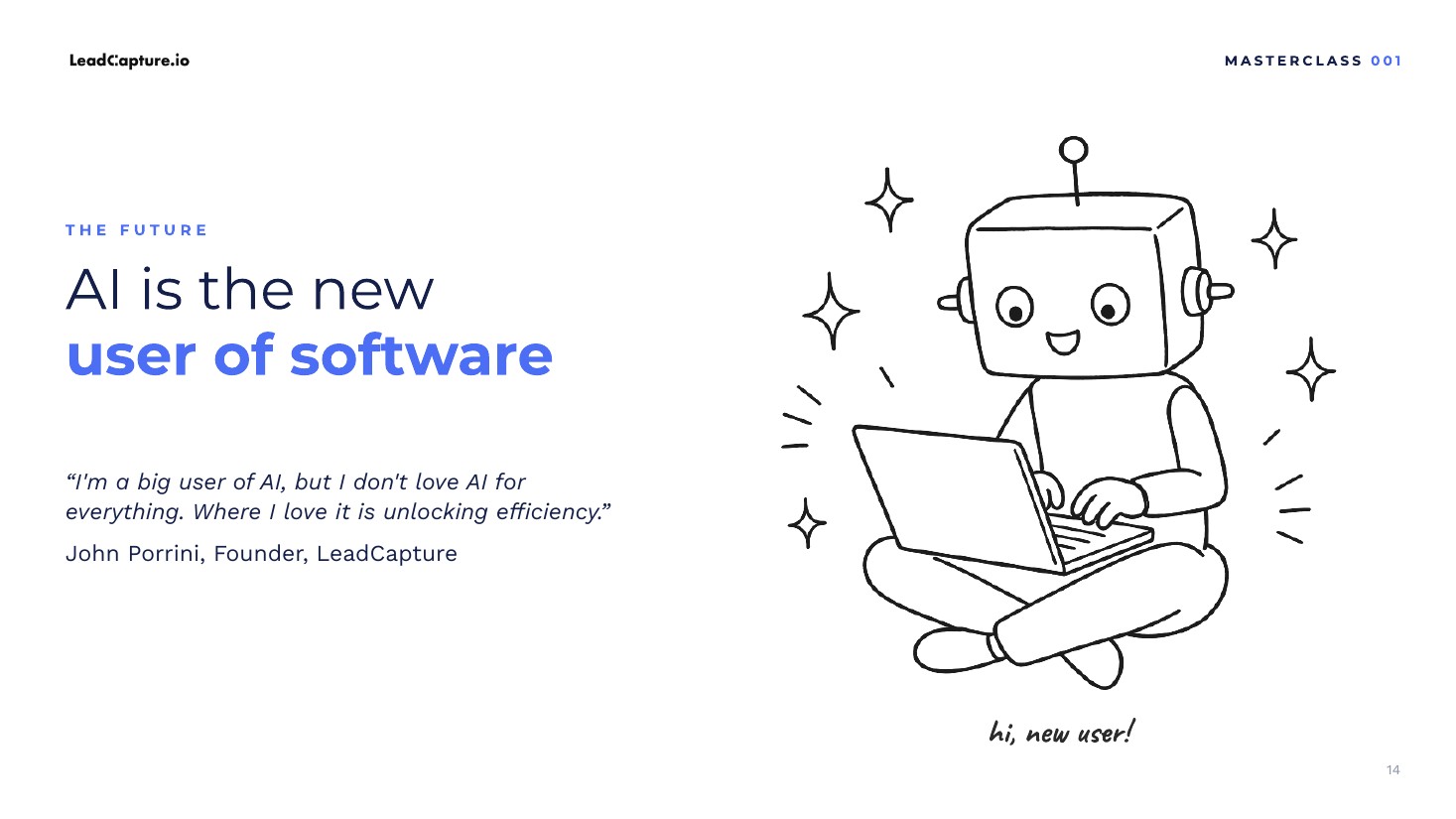
AI, in my opinion, is the new user of software. Humans are always going to use software, and we will always continue to go into software. But over time we're going to see a shift where AI is doing most of the work on our behalf to make us more efficient. It's not about replacing people. It's about replacing us at the tasks we don't really want to be doing, the ones that don't really make sense for us to be doing, to free up our time for higher leverage activities.
I don't know about you, but I never enjoy putting reports together. It's one thing to put the report together. It's another thing to then have to analyze it. Having an AI layer on top of that is massive. And as we keep building LeadCapture, we're coming at it from the perspective of how we enable agents to come into the platform, pull data and work to make you more efficient, and not just more efficient, but to help you get better results. That's where everything is headed, and that's what I truly believe. Now, the full prompt.
28:21The full prompt and what to do if it does not fit
I don't know where you're watching this. I'm going to put it on YouTube and in our newsletter, and with the newsletter I'll include the prompt. If you don't find the prompt, go to leadcapture.io and you'll find it there. I'll also leave it up here so you can screenshot it and send the prompt to your own agent. There's three sections to this. Here's the second section; I couldn't fit it all on one page. And the third section.
If this prompt doesn't work for you, go over to your agent. Let's say it's Grokbot; I have a chief of staff. Tell it you want it to create a reporting agent, tell it everything you want, and then end it with: and based on what you understand about reporting in my business, I also want you to fill in the gaps and help me determine what's going to be included in my dashboard. And it will get everything set up for you.
So that is the end of the Masterclass presentation. I will have many more in the future around AI workflows, conversion rate optimization, lead quality, compliance, and the list will go on and on. Thank you for watching. Feel free to reach out if you have any questions.
More from the LeadCapture Masterclass
Next episodes cover conversion rate optimization, lead quality, and compliance. They are not live yet.
Build the funnel your agent reports on
Start free with LeadCapture. Funnel Forensics, consent, and MCP tools included.
Fill Your Funnel
See how multi-step funnels, consent, and conversion sync fit together.
Download the slides
Free PDF of the Masterclass 001 deck. Same content as the video visuals.